
FXFlow: Automated Web Scraping Pipeline for CBSL Exchange Rates Using Playwright
The article explores how a fully automated pipeline can be built to scrape and store daily exchange rate data from the Central Bank of Sri Lanka. Using tools like Playwright and AWS services, it demonstrates how web data can be reliably extracted, processed, and delivered through a scalable, serverless workflow.
In today’s fast-paced financial world, having up-to-date exchange rates is crucial. FXFlow is a fully automated serverless web scraping pipeline that extracts daily exchange rates from the Central Bank of Sri Lanka (CBSL) and saves the data in CSV format directly to an S3 bucket for further analysis.
I have used Terraform to provision the cloud infrastructure, including AWS Lambda for serverless execution, Amazon S3 for storage, and Amazon EventBridge to schedule daily data scraping. GitHub Actions were used to set up a CI/CD workflow to automatically build and push the Docker container image to AWS ECR, ensuring that the Lambda function always runs the latest version of the scraper. I had to use Playwright to handles the actual web scraping, navigating CBSL’s site, filling in required selections, and downloading exchange rate data.
This combination of tools ensures a reliable, maintainable, and fully automated workflow that delivers daily exchange rate data without manual intervention.
Data Source
The exchange rate data is sourced directly from the Central Bank of Sri Lanka (CBSL), which publishes daily buy and sell rates for multiple currencies.”
https://www.cbsl.gov.lk/?source=post_page-----eca40ab3199e---------------------------------------
Architecture Diagram
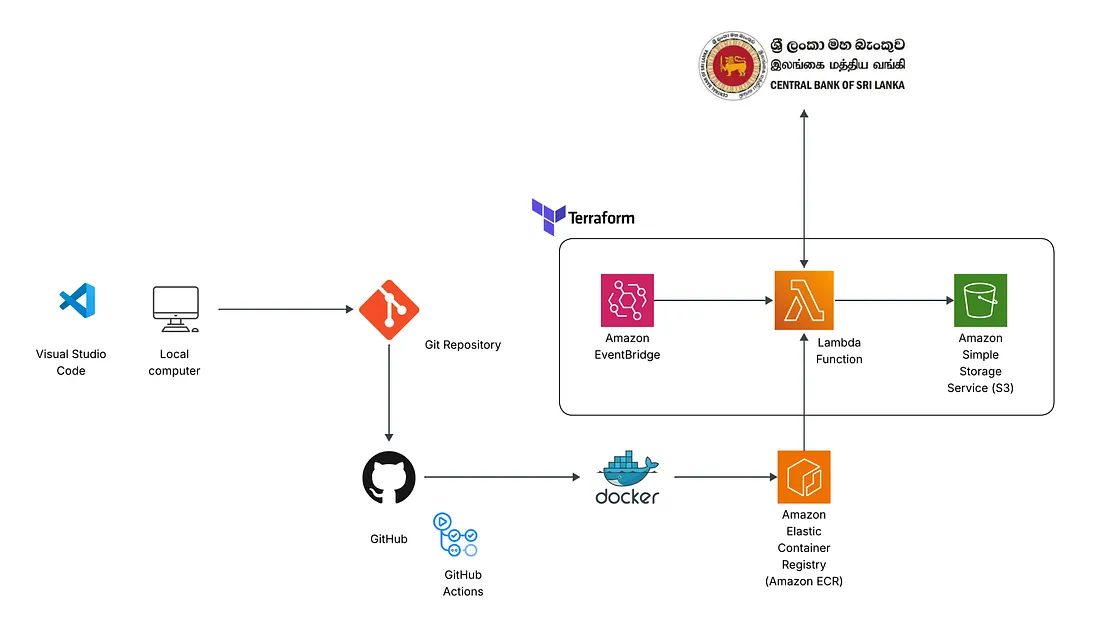
Workflow
Step 1: Python script development with Playwright.
The first step of the project involved developing a Python script to extract exchange rate data from the Central Bank of Sri Lanka (CBSL). Since the CBSL website requires interactive actions — such as selecting specific options, clicking buttons, and navigating within an iframe — Playwright was chosen over BeautifulSoup, as it provides full browser automation capabilities that handle dynamic content and user interactions.
The script automates the following workflow:
- Launches a headless Chromium browser in a serverless-friendly configuration.
- Navigates to the CBSL exchange rates page and interacts with the necessary UI elements (dropdowns, buttons, and frames) to select the desired data range.
- Downloads the resulting exchange rate data in CSV format.
- Uploads the CSV file directly to a designated AWS S3 bucket, making the data immediately available for downstream processing, analytics, or reporting.
This approach ensures reliable, repeatable, and fully automated data extraction, while maintaining compatibility with serverless deployment in AWS Lambda.
To ensure smooth execution within AWS Lambda’s serverless environment, the browser was launched in headless mode (headless=True) with several specific arguments to disable GPU, sandboxing, and other features that are not supported in Lambda containers. These arguments (args=[...]) prevent runtime errors and allow the script to run reliably in a constrained, serverless context.
Step 2: Dependency Identification and Dockerfile Development
While the Python requirements.txt file for this project included only two core libraries, boto3 for AWS interactions and Playwright for browser automation. Deploying Playwright in a serverless AWS Lambda environment required addressing a much broader set of system-level dependencies.
Playwright’s Chromium browser depends on multiple shared libraries (such as libx11, libgbm1, libnss3, libasound2, and others) that are not included in the default Python runtime used by Lambda. To ensure smooth execution, these libraries were explicitly installed in the Docker image using the apt-get command. Additionally, font libraries (fonts-liberation) and cache directories were configured to prevent runtime errors related to rendering and font management.
Finally, Playwright and Chromium were installed using:
RUN playwright install --with-deps chromiumThis ensures that both the browser and its required dependencies are properly bundled during the image build process.
To support Playwright’s operation in Lambda’s restricted runtime, several environment variables and arguments were configured:
PLAYWRIGHT_BROWSERS_PATHto define a consistent browser installation directory.--no-sandbox,--disable-gpu, and related flags to run Chromium securely without GPU or sandbox dependencies.
The container’s entry point was defined as:
CMD ["python3", "-m", "awslambdaric", "main.lambda_handler"]which allows AWS Lambda to invoke the lambda_handler function seamlessly.
Step 3: CI/CD Pipeline and Docker Image Deployment with GitHub Actions.
To automate the deployment process, a GitHub Actions workflow was created to build and publish the Docker image to Amazon Elastic Container Registry (ECR).
Every time a change is pushed to the main branch, the workflow triggers automatically. It authenticates with AWS using securely stored credentials, builds the latest version of the Docker image, and pushes it to the ECR repository. This ensures that AWS Lambda always runs the most recent, production-ready version of the Playwright scraper without any manual intervention.
By integrating GitHub Actions, the project achieves continuous integration and continuous deployment (CI/CD) — enabling fast iteration, reproducibility, and version-controlled deployments for the scraping pipeline.
Step 4: Use Terraform to build infrastructure.
To manage and deploy the cloud infrastructure efficiently, Terraform was used to provision all required AWS resources — including Lambda, S3, and EventBridge.
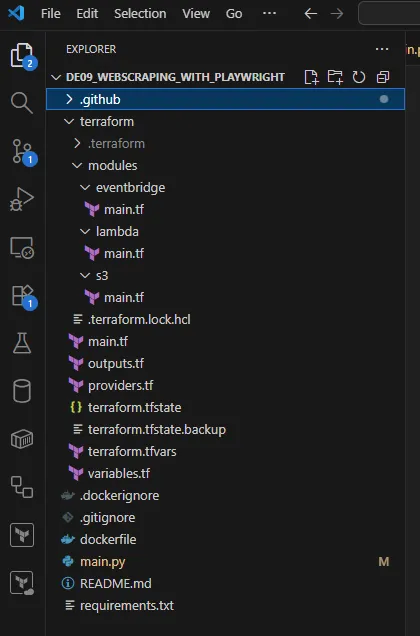
Terraform scripts define the infrastructure as code, ensuring consistent, repeatable, and version-controlled deployments. The S3 bucket is used to store the scraped CSV data, the Lambda function hosts and executes the Playwright-based scraper (via the Docker image pulled from ECR), and EventBridge schedules the Lambda to run automatically at a defined time each day.
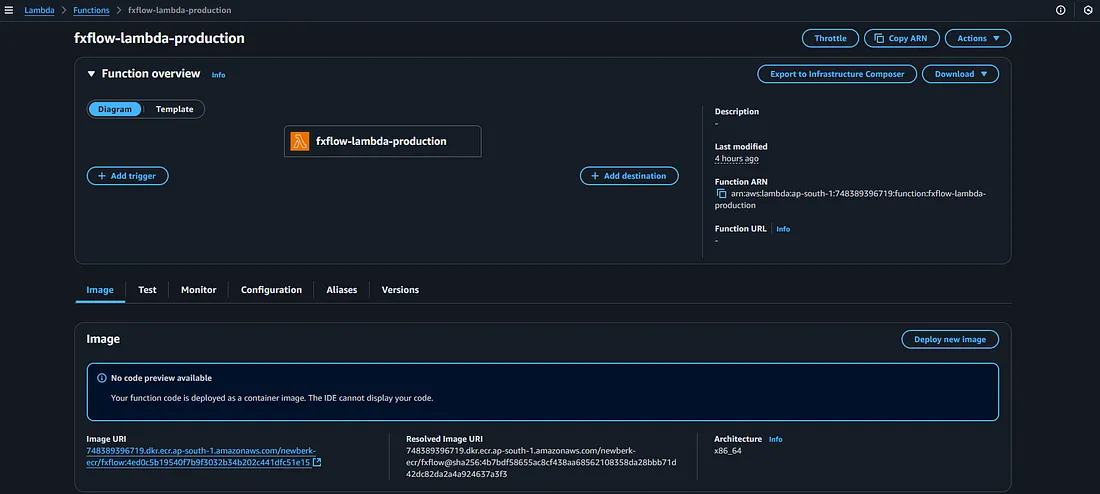
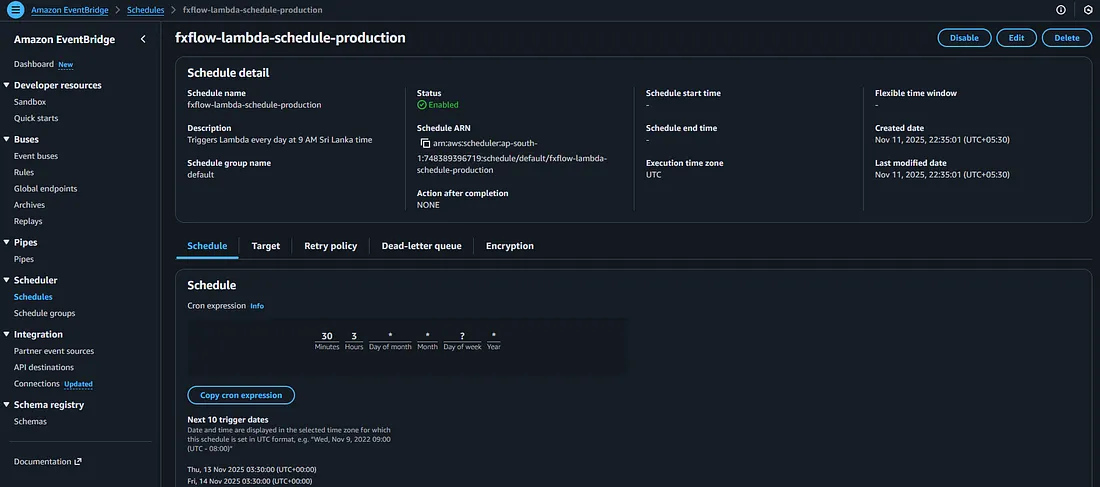
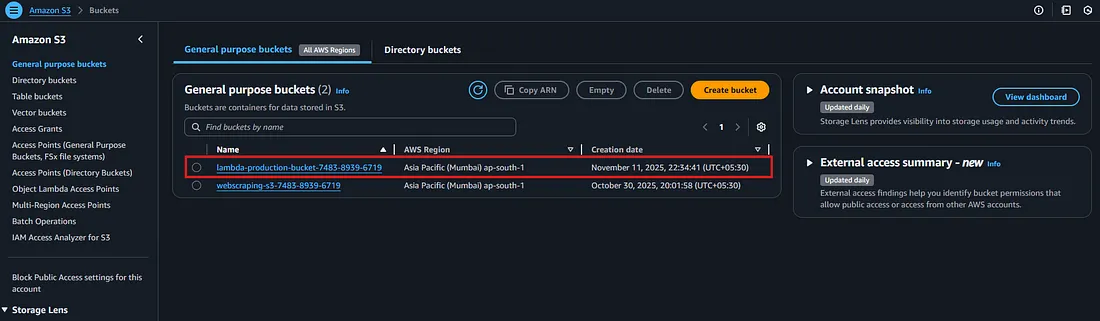
This setup eliminates the need for manual infrastructure management, enabling fully automated and serverless execution of the data scraping pipeline.
Additionally, the Terraform configuration was structured using modules, making the setup modular, reusable, and easy to maintain. This modular approach allows each component (Lambda, S3, and EventBridge) to be developed, tested, and updated independently, simplifying scaling or integration with future pipelines.
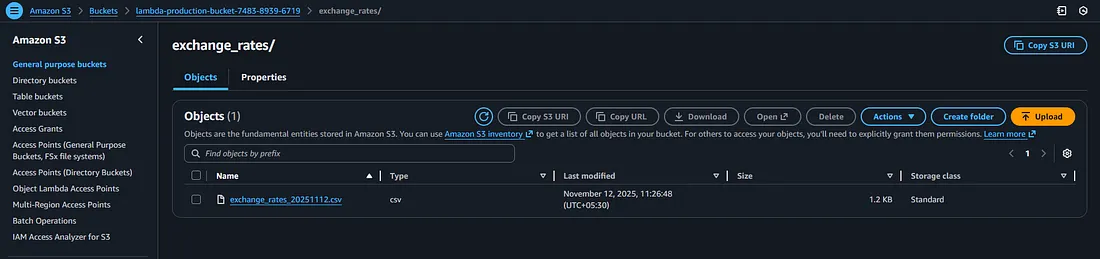
After provisioning the infrastructure with Terraform and resolving all deployment challenges, the automated data extraction pipeline ran successfully, and the exchange rate data was extracted and stored in the designated S3 bucket — marking the completion of a fully functional, end-to-end serverless scraping workflow.
Learning Outcomes
Building this project provided hands-on experience in integrating multiple modern technologies to create a fully automated data pipeline.
- Terraform: Gained a deep understanding of Infrastructure as Code (IaC) principles — defining, provisioning, and managing AWS resources such as Lambda, S3, and EventBridge in a reusable and modular way.
- Playwright: Learned how to handle dynamic web pages where traditional scraping libraries like BeautifulSoup fall short. Managing headless browser operations and tuning runtime arguments for smooth execution inside AWS Lambda provided valuable practical insights.
- GitHub Actions & CI/CD: Experienced the full DevOps cycle — automating Docker image builds, pushing them to AWS ECR, and ensuring that the Lambda function always runs the latest stable version of the scraper.